SELECTED WORK / 01
MATERIALS · ERP / SCMJajaeOn자재온
필요한 자재가,
필요한 프로젝트에.The right materials.
The right project.
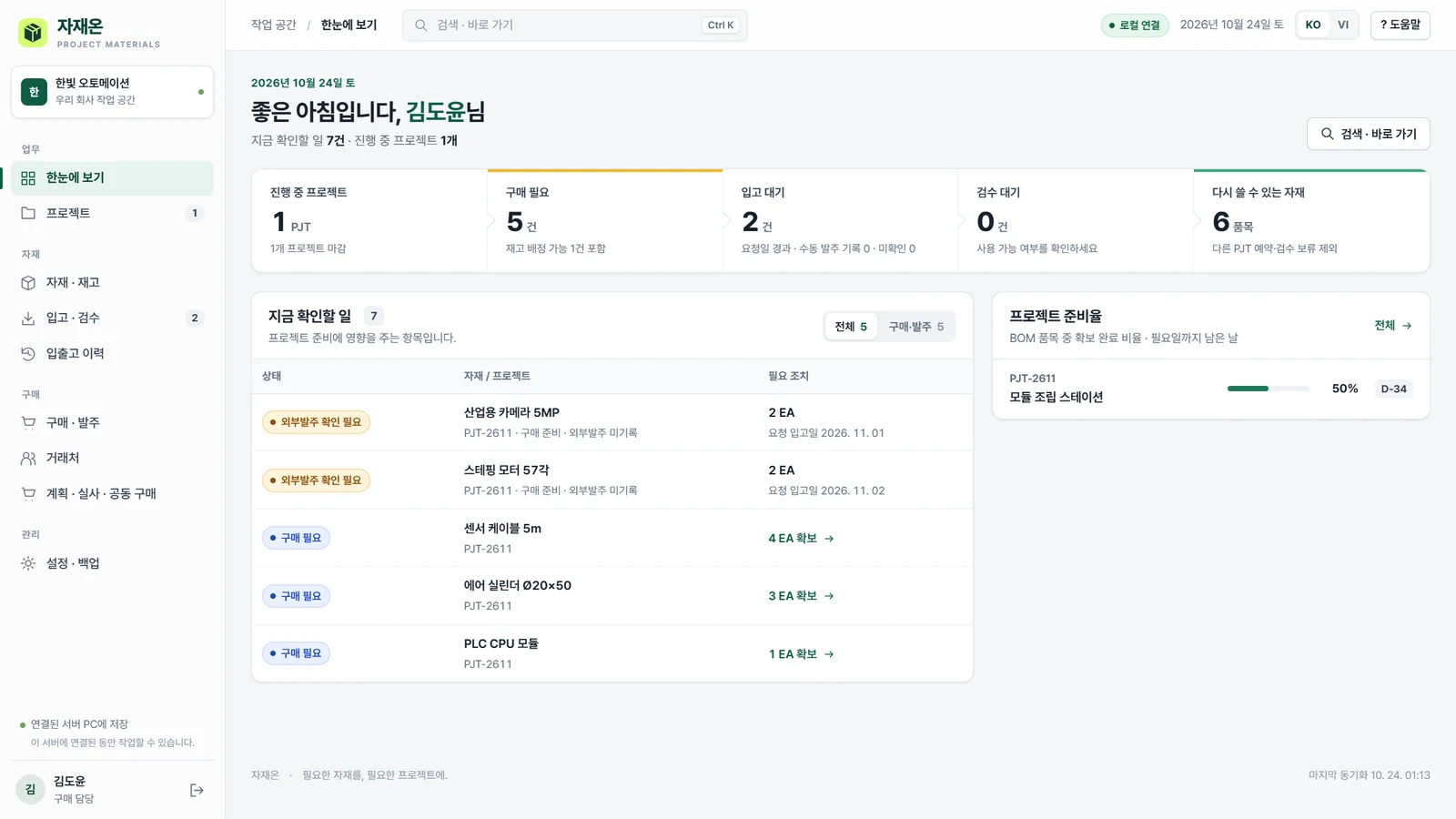
실제 앱 화면 · 합성 데이터Actual application · Synthetic data
- ROLE
- 업무 흐름·기능 정의 / AI를 활용한 구현·테스트 / Windows 패키징 / 시연 제작Workflow and feature definition / AI-assisted implementation and testing / Windows packaging / Demo production
- PLATFORM
- Windows 로컬 앱 · 한국어 / 베트남어Windows local app · Korean / Vietnamese
- BUILT WITH
- Node.js · SQLite · HTML / CSS / JavaScript
THE PROBLEM
재고가 있어도 다시 사고,
프로젝트가 끝나도 자재는 남습니다.Available stock gets overlooked.
Finished projects leave materials behind.
소규모 제조 현장에서 BOM, 창고 재고, 구매 내역이 따로 움직이면 “지금 무엇을 얼마나 사야 하는지”를 다시 맞춰야 합니다. 자재온은 이 질문을 프로젝트별 수요와 재고 배정에서 시작하도록 설계했습니다.When BOMs, stock and purchase records live apart, deciding what to buy requires repeated reconciliation. JajaeOn starts with project demand and stock allocation.
THE APPROACH
먼저 재고를 배정하고,
부족한 만큼 구매합니다.Allocate available stock.
Then purchase the shortfall.
입고 후에는 프로젝트별로 배분하고, 사용·반납·마감까지 이력을 연결합니다. 한 번 입력한 품목과 수량이 다음 담당자의 작업으로 이어지게 만드는 것이 핵심입니다.Receipts are allocated to projects and linked to issues, returns and closeout. The same item and quantity continue into the next person’s task.
- 01BOMImport가져오기
- 02재고Allocate배정
- 03구매Purchase견적·발주
- 04입고Receive배분·검수
- 05마감Reuse반납·재사용
INSIDE THE PRODUCT
화면으로 보는 업무 흐름.A closer look at the work.
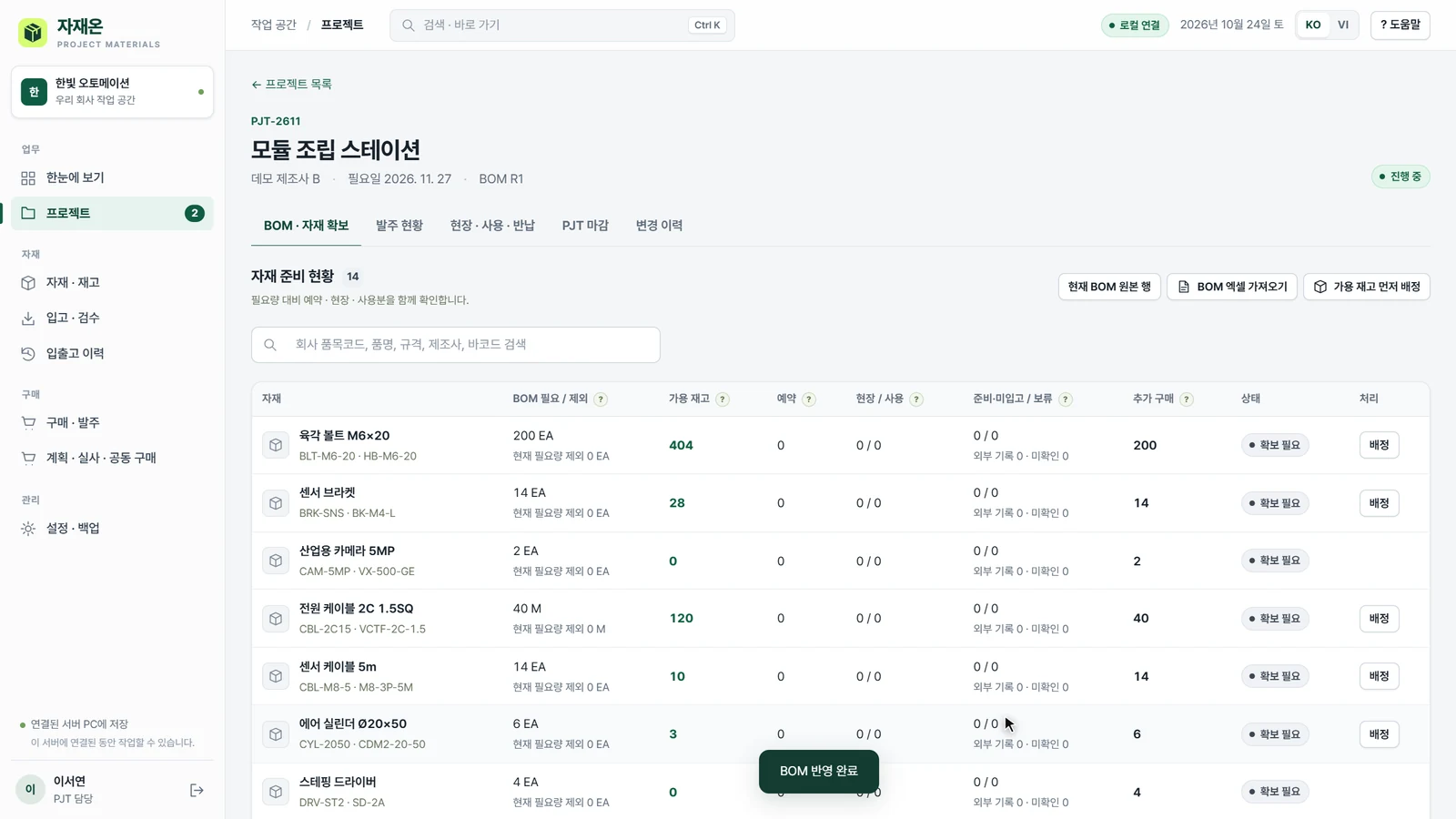
엑셀을 가져와, 구매 전에 재고부터.Import Excel. Check stock before purchasing.
기존 BOM의 열을 매핑하고 품목·수량을 확인합니다. 가용 재고를 배정한 뒤 구매가 필요한 수량을 구분합니다.Map spreadsheet columns, check items and quantities, then allocate stock to identify the remaining purchase need.
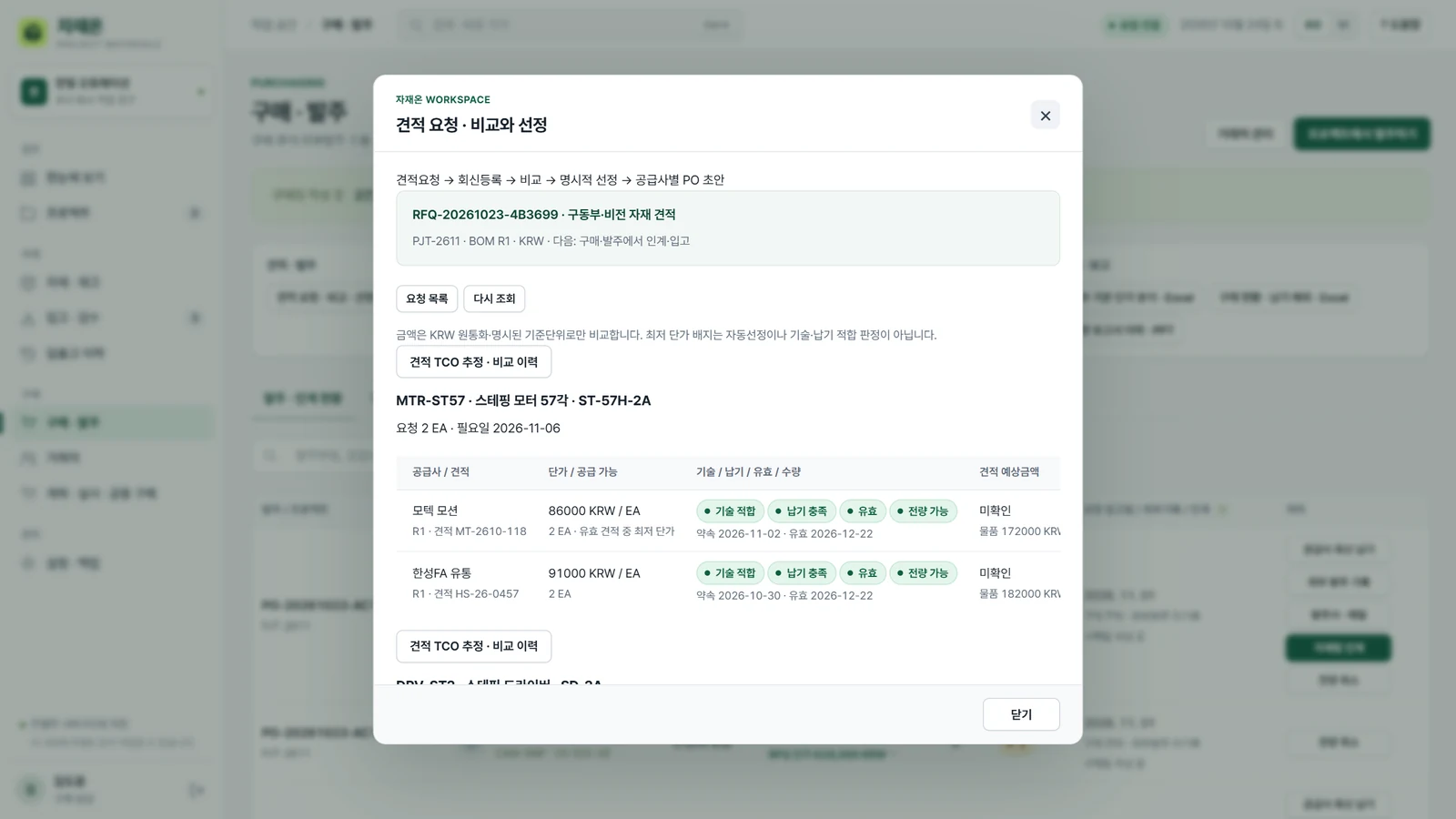
가격과 납기를 같은 화면에서.Price and delivery, side by side.
공급사의 견적과 납기를 비교하고, 선택한 내용을 발주 문서와 담당자 인계로 연결합니다.Compare supplier prices and delivery dates, then connect the selection to a purchase document and warehouse handoff.
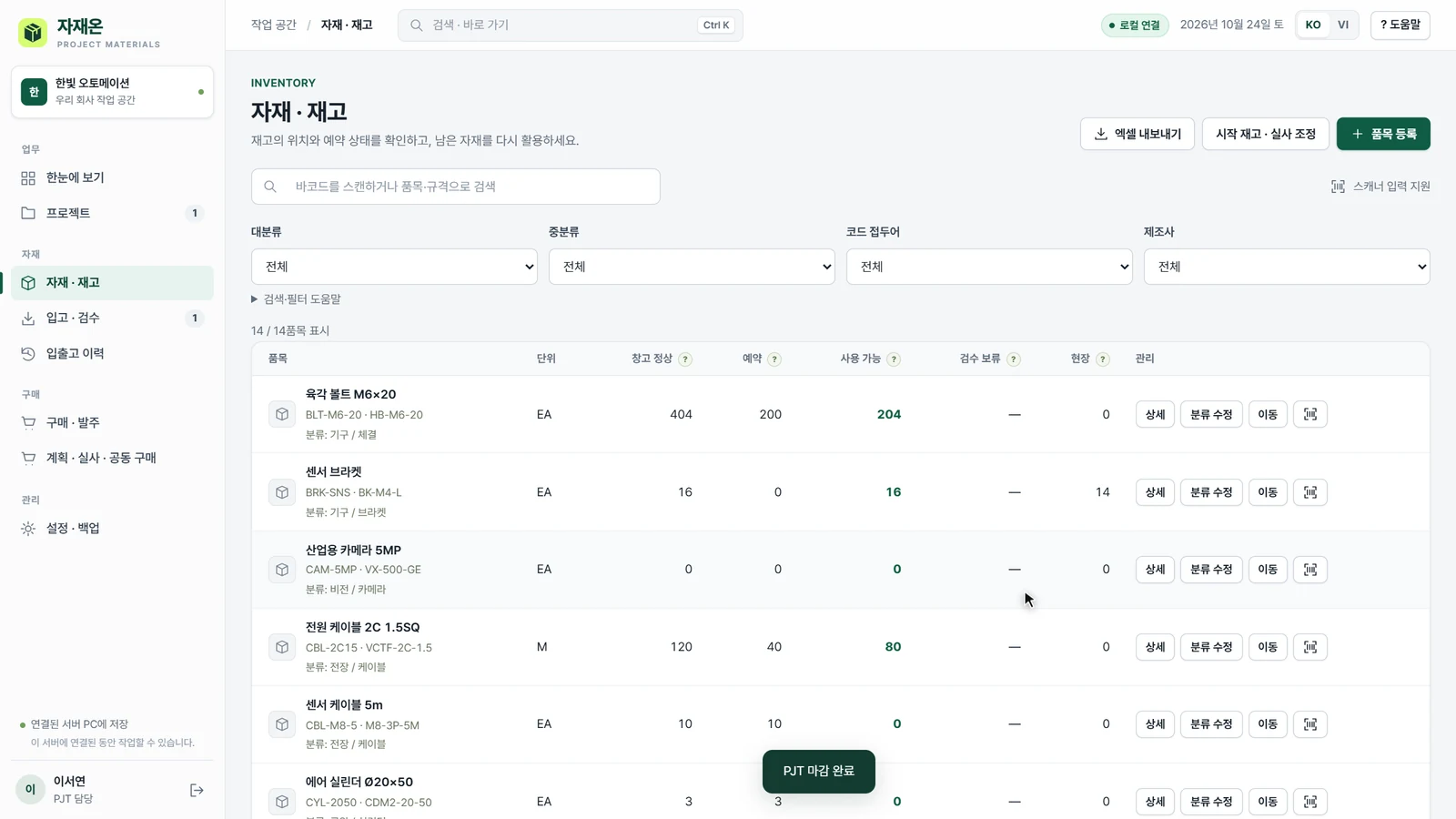
끝난 프로젝트의 자재를 다음 일로.Make leftover materials available again.
프로젝트 마감과 반납, 예약 해제를 반영해 다른 프로젝트에서 다시 사용할 수 있는 자재를 확인합니다.Reflect closeout, returns and released reservations to see what can be used by the next project.
DESIGNING THE WORKFLOW
구현에서 중요하게 본 것들.The decisions that shaped it.
현장의 엑셀에서 시작Start with the existing Excel file
새 양식으로 모두 다시 입력하는 대신, BOM 열 매핑과 미리보기를 먼저 둡니다.Column mapping and preview let teams start with their own BOM format.
계획과 확정을 구분Separate suggestions from commitments
구매 제안은 검토 후 명시적으로 발주합니다. 부분 입고·배분·반품도 각각 기록합니다.Purchase suggestions require explicit confirmation. Partial receipts, allocations and returns have their own records.
처음 실행부터 시연까지From first launch to a usable demo
별도 앱 창, 최초 관리자 생성, 실제 업무와 분리된 연습 공간을 제공합니다.A dedicated app window, first-run administrator setup and a separate practice workspace support onboarding.
WATCH IT IN ACTION / 01:30
설명보다, 직접 보는 90초.See it work in 90 seconds.
실제 앱 · 합성 데이터
음악 포함 · 음성 설명 없음Actual app · Synthetic data
Music · No voice-over
보고 싶은 장면으로 이동JUMP TO A SCENE
영상 다운로드Download film ↓영상의 흐름을 글로 보기Read the film walkthrough
- BOM 가져오기Import BOM
- 재고 배정Allocate stock
- 견적 비교Compare quotes
- 인계·입고Handoff & receiving
- 마감·재사용Close & reuse
- 관리자 확인Owner review
시연은 합성 데이터로 촬영했습니다. 로컬 자재·구매 업무 도구이며, SAP 연동이나 공식 회계·실제 지급 기능을 제공한다는 의미는 아닙니다.Filmed with synthetic data. This is a local materials and purchasing tool; the demonstration does not imply SAP integration, statutory accounting or payment execution.
시연은 합성 데이터로 촬영했습니다. 로컬 자재·구매 업무 도구이며, SAP 연동이나 공식 회계·실제 지급 기능을 제공한다는 의미는 아닙니다.Filmed with synthetic data. This is a local materials and purchasing tool; the demonstration does not imply SAP integration, statutory accounting or payment execution.