SELECTED WORK / 02
BOOKING · CUSTOMER · OPERATIONSDANGOL단골
예약 한 건부터,
매장의 하루 전체까지.From one booking
to a whole day in store.
실제 앱 화면 · 합성 데이터Actual application · Synthetic data
- ROLE
- 매장 운영 흐름·기능 정의 / AI를 활용한 구현·테스트 / 웹 배포 / 시연 제작Store workflow and feature definition / AI-assisted implementation and testing / Web deployment / Demo production
- PLATFORM
- 반응형 웹 앱 · 한국어 / 중국어 / 베트남어Responsive web app · Korean / Chinese / Vietnamese
- BUILT WITH
- Cloudflare Workers · D1 / SQLite · JavaScript
THE PROBLEM
예약은 대화에,
매장 상황은 직원의 기억에.Bookings in conversations.
Store knowledge in someone’s memory.
여러 채널의 문의, 담당자 배정, 방문 이력과 수납 기록이 흩어져 있으면 작은 변경도 다시 확인해야 합니다. DANGOL은 예약 한 건을 중심으로 고객과 직원의 일을 연결합니다.When inquiries, staff assignments, visit histories and receipts are scattered, even a small change needs another conversation. DANGOL connects customer and staff tasks around each booking.
THE APPROACH
손님의 예약에서
사장님의 확인까지.From a customer’s request
to the owner’s review.
고객은 휴대폰으로 예약을 요청하고, 직원은 시간·담당자·시설을 확인합니다. 방문 이력과 메모, 수납 제출·승인, 매장별 보고서가 같은 업무 안에서 이어집니다.Customers request appointments on mobile. Staff check time, people and resources. Visit notes, receipt submission and approval, and store reports continue in the same workflow.
- 01문의Assign담당자 지정
- 02예약Book시간·시설
- 03고객Remember방문 기록
- 04수납Review제출·승인
- 05매장Report보고서
INSIDE THE PRODUCT
화면으로 보는 업무 흐름.A closer look at the work.
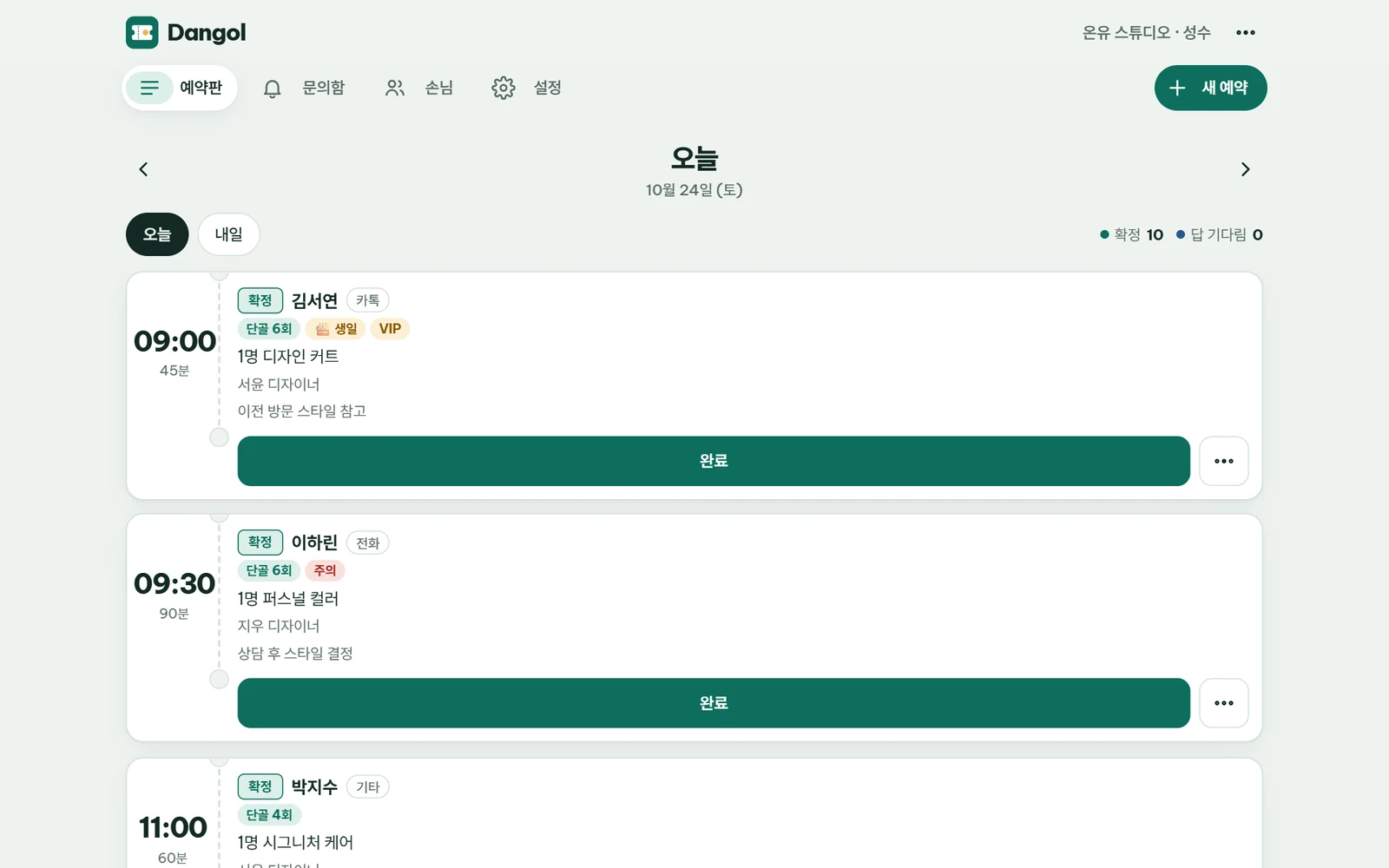
오늘 해야 할 일을, 한눈에.See today’s work in one place.
시간, 담당 직원, 예약 상태와 고객 메모를 함께 확인합니다. 고객의 공개 예약 요청도 같은 업무 흐름으로 이어집니다.Review times, staff, booking status and customer notes together. Public booking requests feed into the same workflow.
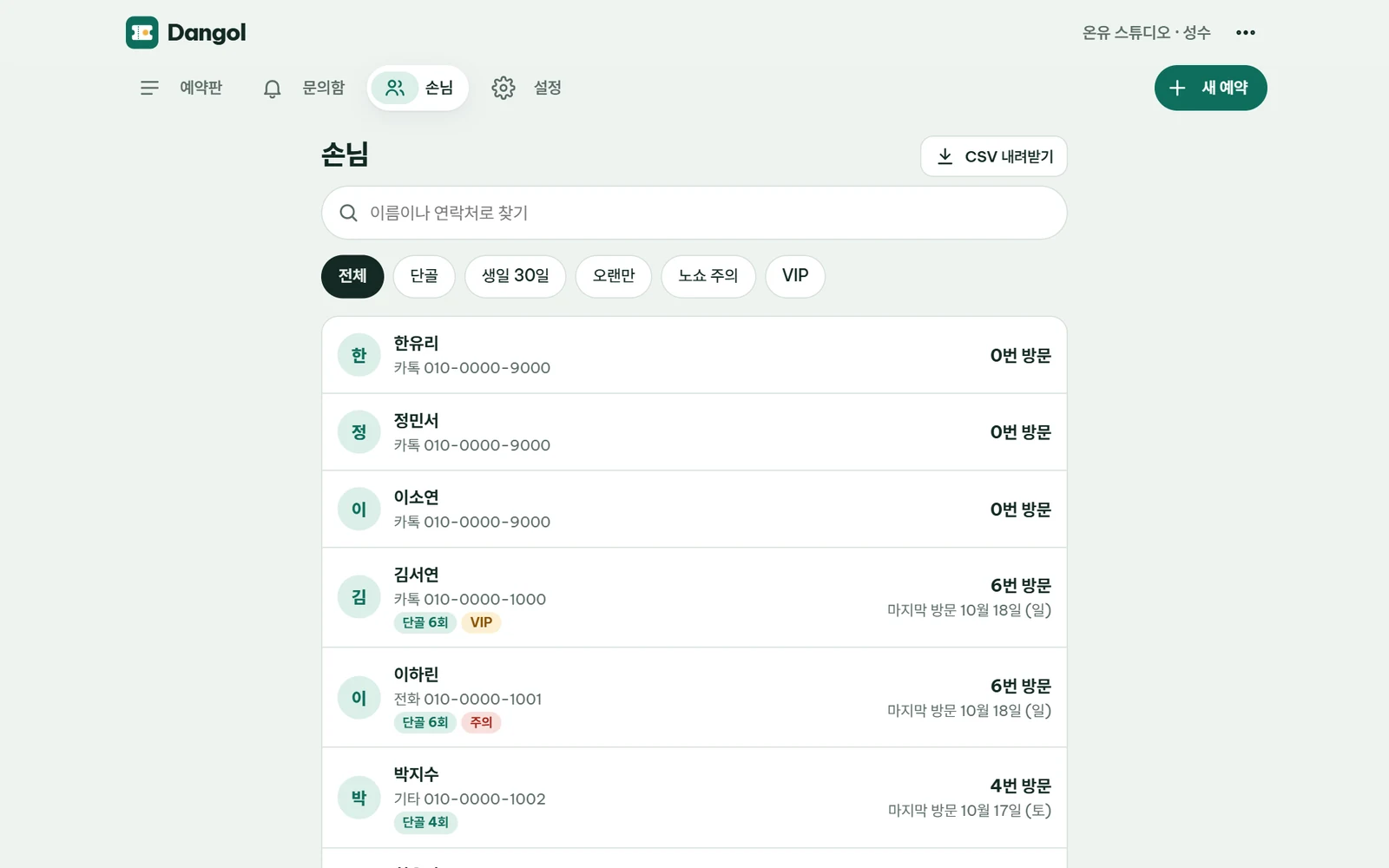
다시 온 손님을 더 잘 기억하도록.Remember the customer who returns.
방문 이력, 메모와 태그를 모아 다음 응대에 필요한 정보를 이어갑니다.Visit history, notes and tags keep useful context ready for the next appointment.
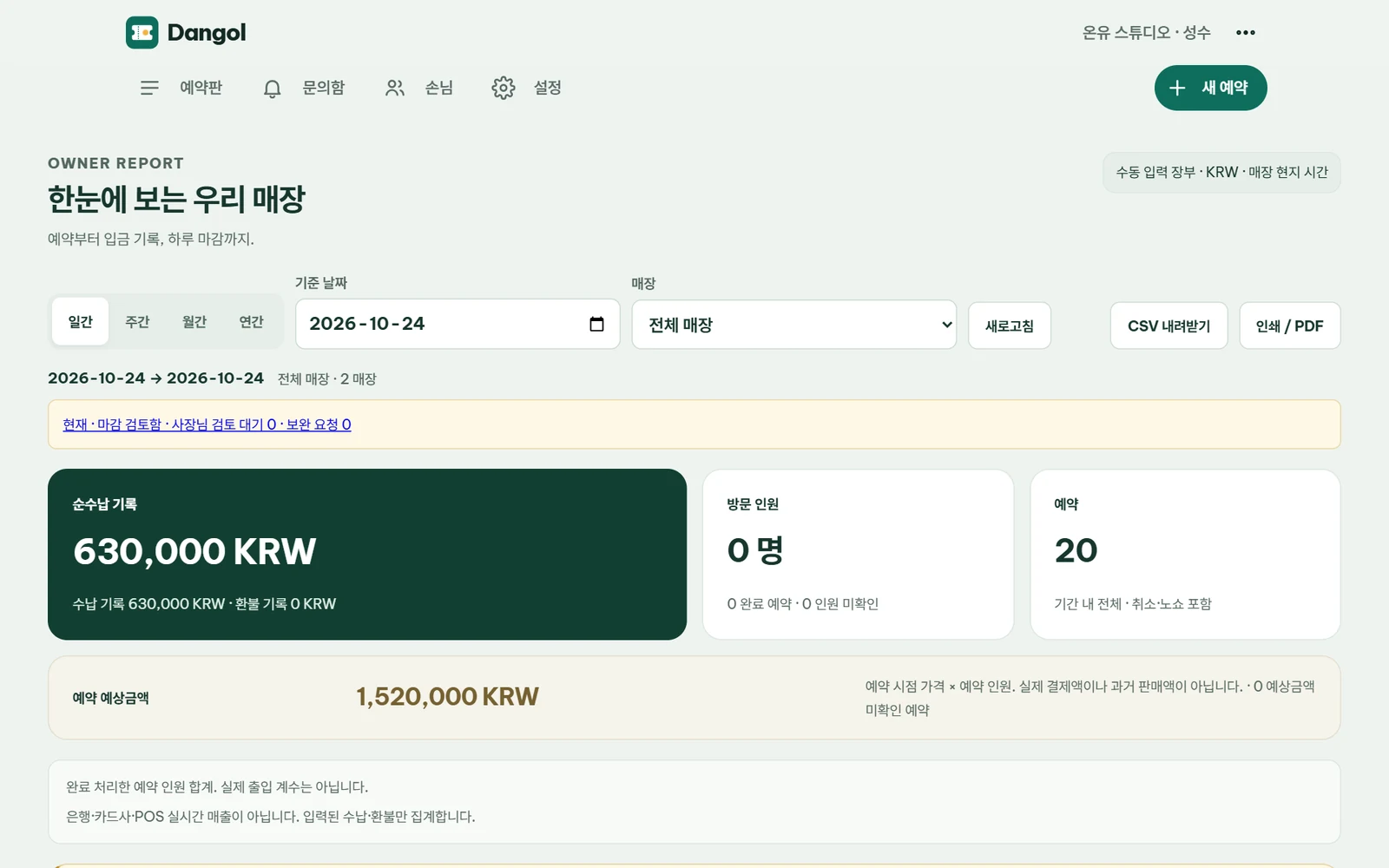
직원의 기록을 사장님의 판단으로.Turn staff records into an owner’s overview.
수동 수납 기록의 제출·승인을 구분하고, 기간과 매장별 보고서에서 운영 흐름을 확인합니다.Separate receipt submission from approval, then review operating records by period and store.
DESIGNING THE WORKFLOW
구현에서 중요하게 본 것들.The decisions that shaped it.
PC와 모바일을 함께One workflow across devices
고객의 예약 요청, 직원의 업무, 사장님의 확인을 각 화면 크기에 맞게 연결합니다.Customer requests, staff work and owner review adapt to the device in use.
예약 충돌을 먼저 확인Check conflicts before confirmation
정원·근무시간·시설 중복을 검증해 예약을 확정하기 전에 확인할 수 있게 합니다.Capacity, working hours and resource conflicts are checked before confirming a booking.
입력과 승인을 분리Keep submission and approval distinct
직원 수납 제출과 관리자 승인, 환불·마감 이력을 구분합니다.Staff receipt submission, owner approval, refunds and closeout remain distinct records.
WATCH IT IN ACTION / 01:30
설명보다, 직접 보는 90초.See it work in 90 seconds.
실제 앱 · 합성 데이터
음악 포함 · 음성 설명 없음Actual app · Synthetic data
Music · No voice-over
보고 싶은 장면으로 이동JUMP TO A SCENE
영상 다운로드Download film ↓영상의 흐름을 글로 보기Read the film walkthrough
- 오늘의 예약Today’s board
- 모바일 예약Mobile booking
- 문의·담당자Assign inquiries
- 예약 확정Confirm booking
- 고객 이력Customer history
- 수납·승인Receipts & approval
- 매장 보고서Store reports
시연의 매장·고객·수납은 모두 합성 데이터입니다. 수납은 수동 입력·승인 장부이며 카드사·POS 자동 연동이 아닙니다. AI·Zalo 연동은 별도 서비스 설정이 필요합니다.Stores, customers and receipts in the film are synthetic. Receipts are manually entered and approved, not a card processor or POS integration. AI and Zalo integrations require separate service configuration.
시연의 매장·고객·수납은 모두 합성 데이터입니다. 수납은 수동 입력·승인 장부이며 카드사·POS 자동 연동이 아닙니다. AI·Zalo 연동은 별도 서비스 설정이 필요합니다.Stores, customers and receipts in the film are synthetic. Receipts are manually entered and approved, not a card processor or POS integration. AI and Zalo integrations require separate service configuration.